


Big News: Free Plan users can now create team accounts and invite unlimited teammates to collaborate!
/Changelog

Changelog

The latest product updates from Neon

RSS feed

Postgres version updates

We updated supported Postgres versions to 14.21, 15.16, 16.12, 17.8, and 18.2, respectively.

SELECT version();
PostgreSQL 18.2 (e21737f) on aarch64-unknown-linux-gnu, compiled by gcc (Ubuntu 13.3.0-6ubuntu2~24.04.1) 13.3.0, 64-bit

When a new minor version is available on Neon, it is applied the next time your compute restarts. For more about how we handle Postgres version upgrades, refer to our Postgres version support policy.

TimescaleDB on Postgres 18

We've added support for the timescaledb extension on Postgres 18. Install it with:

CREATE EXTENSION timescaledb;

See The timescaledb extension for setup and usage.

New Neon Agent Skill: Claimable Postgres (pg.new)

We've added claimable-postgres to the Neon Agent Skills collection. With this skill, your AI assistant can provide an instant temporary database via Claimable Postgres by Neon and obtain a connection string autonomously, without human intervention, account creation, or credit card. For details, see Claimable Postgres by Neon.

How to get Neon Agent Skills

npx (skills only):

npx skills add neondatabase/agent-skills -s claimable-postgres

Neon Agent Skills repository

Git worktrees with Neon branching

Run multiple AI coding agents in parallel without collisions by giving each agent its own Git worktree (isolated working directory) and Neon database branch from a single repository. The guide shows how to avoid file, Git, and database conflicts and ties it together with a post-checkout hook so spinning up a new agent with its own database takes one command. See the guide: Git worktrees with Neon branching.

Google Jules and Neon MCP

Use the Neon MCP Server with Google Jules to give AI agents an isolated database branch for each feature. Connect Jules to Neon MCP so it can spin up branches, apply schema changes and migrations, and open PRs without touching production. See the guide: Google Jules and Neon MCP.

Fixes and improvements

Data anonymization

Anonymized branches are now supported on projects with IP Allow or Private Networking enabled. You can now create and use anonymized branches for these projects without restriction. For more information, see Data anonymization.

Neon Auth

We fixed an issue where deleting a database with Neon Auth left stale state and caused 500 errors when opening Neon Auth settings (e.g., OAuth or SMTP).

Neon Console

The Drizzle Studio integration that powers the Tables page in the Neon Console has been updated to version 1.3.2. This release fixes a regression where Add ColumnReview and Commit could produce a zod validation error. For the latest improvements and fixes, see the Neon Drizzle Studio Integration Changelog.

PgBouncer

The PgBouncer version used by Neon to offer connection pooling support was updated to version 1.25.1 for the latest updates and patches.

Snapshots

On paid plans, the snapshot limit (10) now applies only to manual snapshots. Scheduled backup snapshots no longer count toward that limit, so scheduled backups will no longer fail when you've already created your maximum number of manual snapshots. For more information, see Backup & restore.
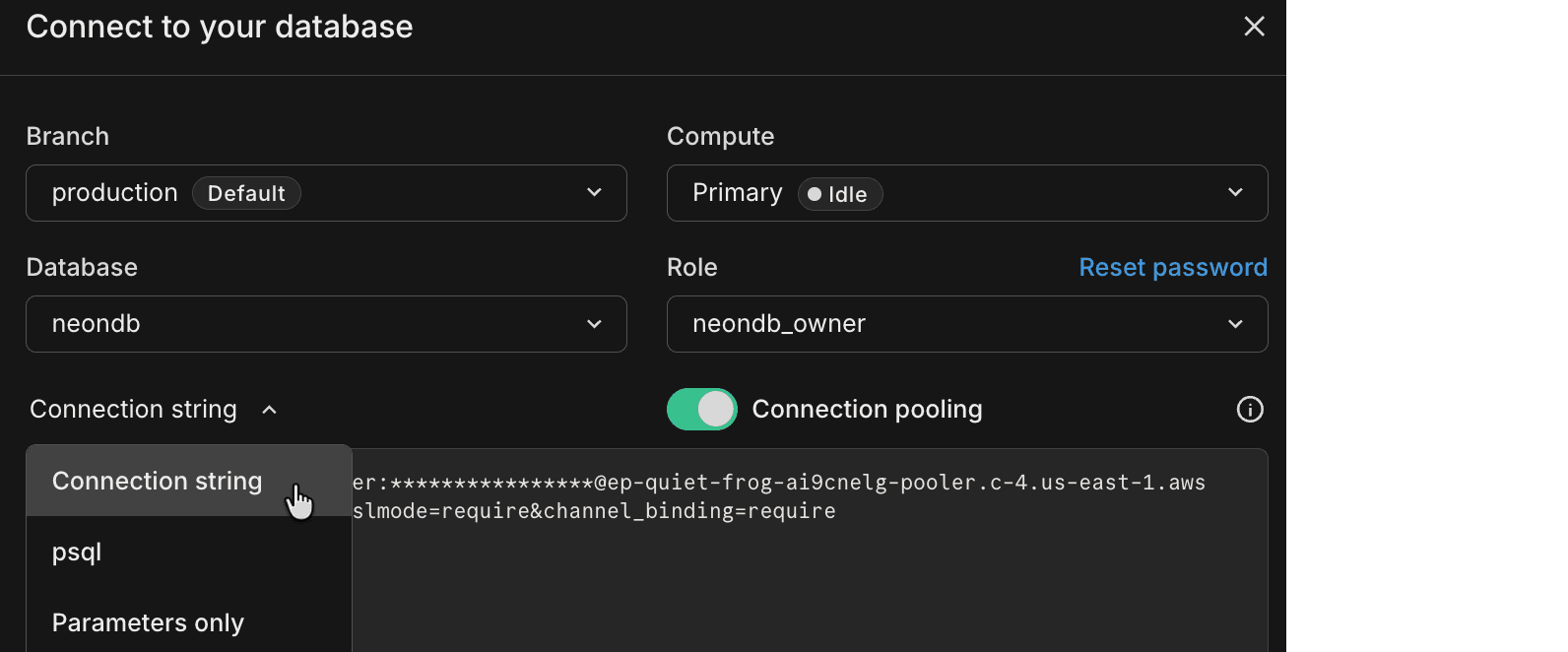
Connect modal defaults to Connection string

Developers told us they want to quickly copy the database connection string to drop into their application. Based on that feedback, the Connect modal on the project dashboard now defaults to Connection string in the snippet dropdown instead of the psql command. You can still choose any snippet from the dropdown (e.g., psql), and your preferred option is saved for the next time you open the Connect modal.

Connection string option in Connect modal

Cursor plugin for Neon

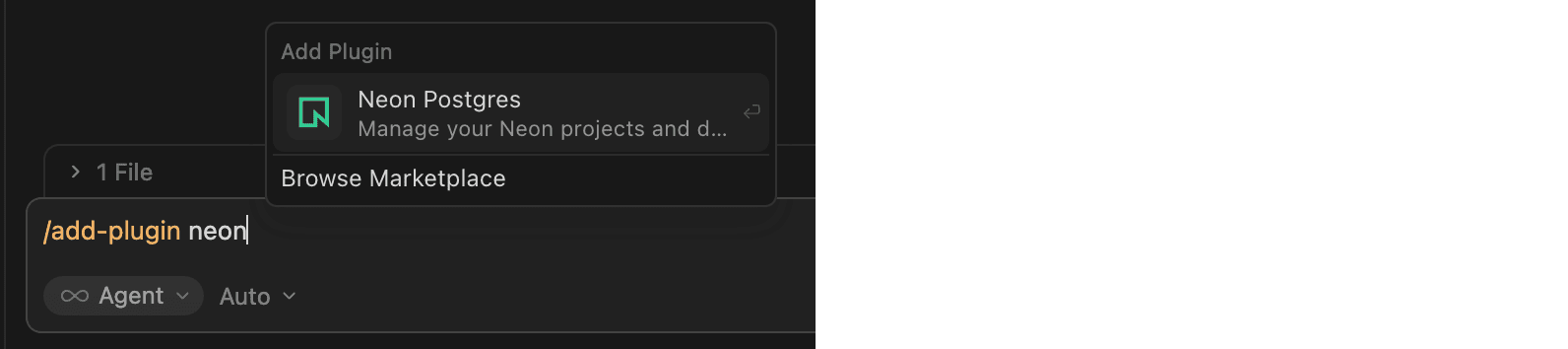
The Neon Cursor plugin is now available. It adds Neon Skills and MCP integration to Cursor so your assistant can use workflow guidance (connection methods, ORMs, branching) and run database operations from natural language, including listing projects, creating branches, running SQL, and more. In Cursor chat, run /add-plugin neon-postgres, or run /add-plugin and search for neon. The plugin appears as Neon Postgres in the Add Plugin menu:

Neon Postgres in the Add Plugin menu

After installation, prompt with "Get started with Neon" to complete authentication. For setup and usage, see Cursor plugin for Neon.

Expanded infrastructure capacity in AWS Europe (Frankfurt)

We've expanded infrastructure capacity in the AWS Europe (Frankfurt) region (aws-eu-central-1). If you have IP allowlists on external systems that Neon connects to, or if you use Private Networking in this region, update your allowlists or VPC endpoint configuration to include any new addresses. See our Regions documentation for the complete list of NAT gateway IPs and the Private Networking guide for VPC endpoint service addresses by region.

Neon CircleCI Orb: a Postgres branch for every pipeline run

A new community-contributed Neon CircleCI Orb provisions a Neon database branch per job, so your CI database is production-like in behavior with fewer "works in CI, breaks in prod" surprises. Each run gets an isolated, ephemeral branch. You can branch from a pre-migrated base to skip running migrations from scratch. The orb handles cleanup and TTL when the job ends. Because each run has its own branch, tests stay deterministic and parallel runs don't share state. Example:

version: 2.1

orbs:
  neon: dhanushreddy291/neon@1.0

workflows:
  test_workflow:
    jobs:
      - neon/run_tests:
          migrate_command: npm run db:migrate
          test_command: npm test

See the Automate branching with CircleCI guide to get started. The guide covers the neon/run_tests job and the neon/create_branch, neon/delete_branch, and neon/reset_branch commands.

Add organization members by domain

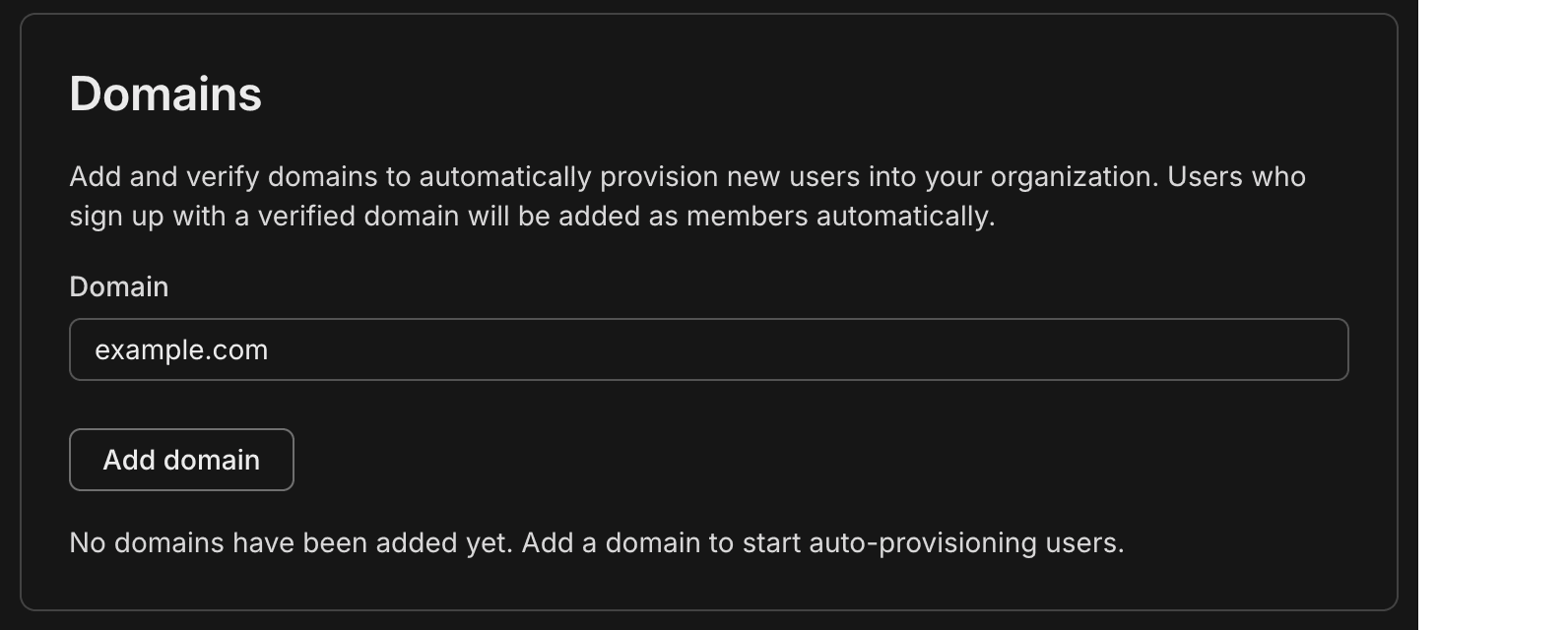
You can now add members to your organization by email domain. Organization admins can add and verify one or more domains (for example, yourcompany.com) in your Neon organization Settings, under Domains.

When a user signs up or logs in to Neon with an email that matches a verified domain, they’re automatically added to your Neon organization as a Member, no invite email required. They see your organization in the org switcher in the Neon Console.

This is useful for teams that want everyone within the company email domain to have access without needing to send individual invites. You simply add your domain in the Neon Console, add a TXT record at your DNS provider to verify ownership, then click Verify in the Neon Console.

Domain section on the Organization Settings page

Colleagues who already have Neon accounts are added to the organization the next time they log in. For the full flow and behavior (roles, multiple domains), see Add members by domain.

Neon MCP Server updates

This week’s Neon MCP Server release brings new tools for pulling Neon documentation and setup guidance into your development environment, plus a new guide for connecting Google Jules to the Neon MCP Server.

New documentation retrieval tools

The MCP Server now includes two tools so your AI agent or MCP client can fetch Neon docs on demand:

  • list_docs_resources – Lists all available Neon documentation pages from the docs index. Returns page URLs and titles so you can choose which page to load.
  • get_doc_resource – Fetches a specific Neon documentation page as markdown. Use list_docs_resources first to discover page slugs, then pass the slug to this tool to load the content.

Together, these tools let your agent or assistant look up setup, configuration, and how-to content from the Neon docs without leaving the chat.

Neon MCP Server on Google Jules

The Neon MCP Server is now available in Google Jules, Google's AI-powered coding assistant. Create a Neon API key, add the server in Jules settings, and you're set. Full setup steps are in Connect MCP clients to Neon.

Neon MCP Server in Google Jules

Compute Autoscaling Report

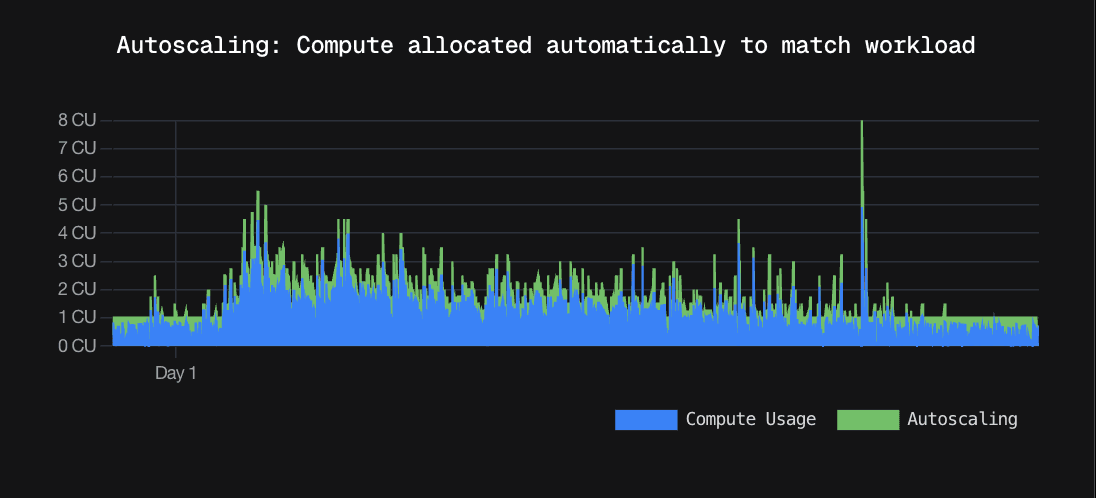
We've published a Compute Autoscaling Report that breaks down how Neon's autoscaling compute compares to provisioned, fixed compute sizes, based on real production workloads that run on Neon.

Key Findings

  • Production databases on Neon use 2.4x less compute and 50% less cost than if they were running on provisioned, fixed compute sizes.
  • Putting the same production workloads on provisioned, fixed compute sizes would result in 55 performance degradations per database per month.
  • Read replicas on Neon use 4x less compute than if they were running on provisioned, fixed compute sizes.
  • Running the same small scale-to-zero workloads on provisioned, fixed compute sizes would cost 7.5x more.

The report walks through what happens when you use provisioned, fixed compute sizes vs. autoscaling compute, and how that impacts cost and performance. If you've ever wondered how much autoscaling actually saves you (or how it behaves under real traffic), the report lays it out with real data and the full methodology.

Autoscaling report graph

To learn more about Neon's autoscaling feature and how to enable it for your projects, see Autoscaling.

Custom API key header for OpenTelemetry

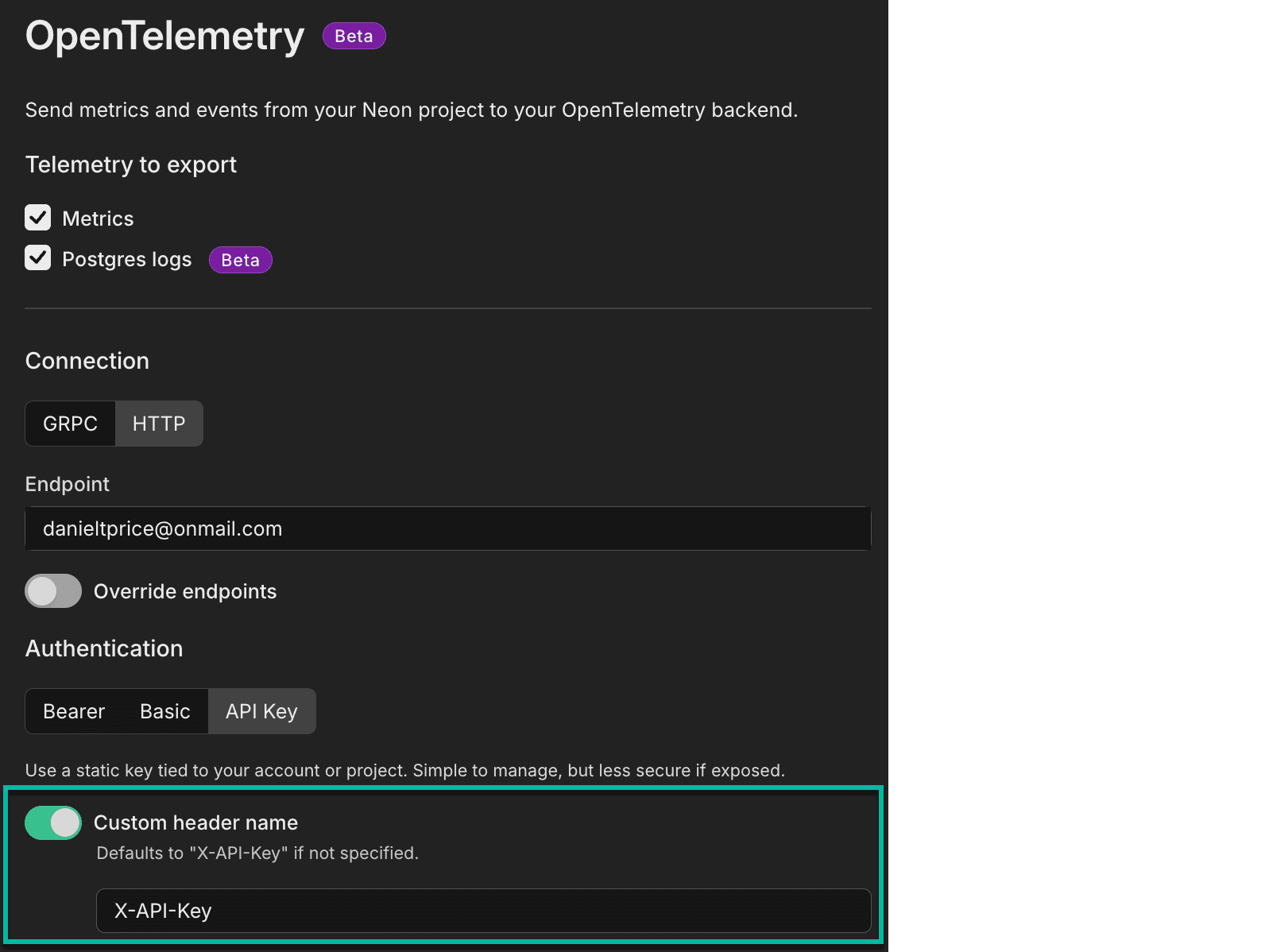
You can now specify a custom header name for API key authentication when configuring OpenTelemetry integrations. The header defaults to X-API-Key if not specified. This makes it easier to integrate with services like Honeycomb that expect a different header name for API keys.

OpenTelemetry custom header name configuration

Was this page helpful?

Subscribe to our changelog.
No spam, guaranteed.